
The journey to becoming an Assistant Professor or securing a Junior Research Fellowship (JRF) begins with a single, crucial step: filling out the UGC NET application form. It might seem like a small detail in the grand scheme of things, but trust me, getting this right is your first victory!
How to Fill Your UGC NET Application Form: A Step-by-Step Guide for Aspirants
My dear aspirants, the dream of excelling in the academic world, whether it’s by becoming an Assistant Professor in a prestigious college or delving deep into research with a JRF, is a noble one. The UGC NET examination is your gateway to these incredible opportunities. While the thought of preparing for the exam can be exciting, the initial hurdle for many is often the application form itself. Don’t worry! It’s not as daunting as it appears. Think of it as laying the first brick for your grand academic mansion. A strong foundation ensures a sturdy structure, doesn’t it?
In this comprehensive guide, we’ll walk you through every single step of the UGC NET online application process. From gathering your documents to hitting that ‘submit’ button, we’ll cover it all, ensuring you apply for the UGC NET exam smoothly and without a hitch. Let’s make sure your journey starts on the right foot!
Why Getting This Right Matters: Your First Step to Success
Imagine meticulously preparing for months, mastering every concept, only to find your application rejected due to a silly mistake in the form. Heartbreaking, isn’t it? An accurately filled application form is not just a formality; it’s a reflection of your attention to detail and seriousness towards this examination. It ensures that your hard work in preparation doesn’t go in vain due to an avoidable administrative error. It saves you from unnecessary stress, last-minute hassles, and the anxiety of potential rejection.
Consider it your first mini-project in this academic pursuit. Complete it diligently, and you build confidence for the larger challenges ahead – like acing the actual exam!
Before You Begin: Your Essential Checklist for Success
Before you even think of opening the official NTA UGC NET website, gather all the necessary documents and information. This pre-preparation is like packing your bag before a big trip – it ensures you don’t forget anything important. Here’s what you’ll need:
- Academic Certificates: Dig out your Mark Sheets and Certificates for Class 10th, 12th, Graduation, and Post-Graduation. You’ll need details like passing year, percentage/CGPA, university/board name.
- Personal Identification: Keep your Aadhaar Card, Voter ID, Passport, or any other valid government ID handy.
- Scanned Photograph: A recent passport-sized coloured photograph (usually 10 KB to 200 KB in JPG/JPEG format). Make sure it’s clear, with a white background, and your face is clearly visible. No selfies or group photos, please!
- Scanned Signature: Your clear signature on a white paper (usually 4 KB to 30 KB in JPG/JPEG format). Practice signing neatly!
- Category Certificate (if applicable): If you belong to OBC (Non-Creamy Layer), SC, ST, or EWS categories, have your valid certificate ready. This is crucial for claiming reservation benefits.
- PwD Certificate (if applicable): For Persons with Disabilities, ensure you have your valid PwD certificate.
- Valid Email ID and Mobile Number: These are vital for all communication from NTA. Make sure they are active and accessible to you.
- Bank Account Details (for fee payment): You’ll need a Debit Card, Credit Card, Net Banking, or UPI details.
Having these ready will make the application process much smoother, like having all your ingredients prepped before cooking a delicious meal!
Step-by-Step Guide: Navigating the UGC NET Online Application Process
Now that you’re fully equipped, let’s dive into the actual process. Follow these steps meticulously, and you’ll be done in no time!
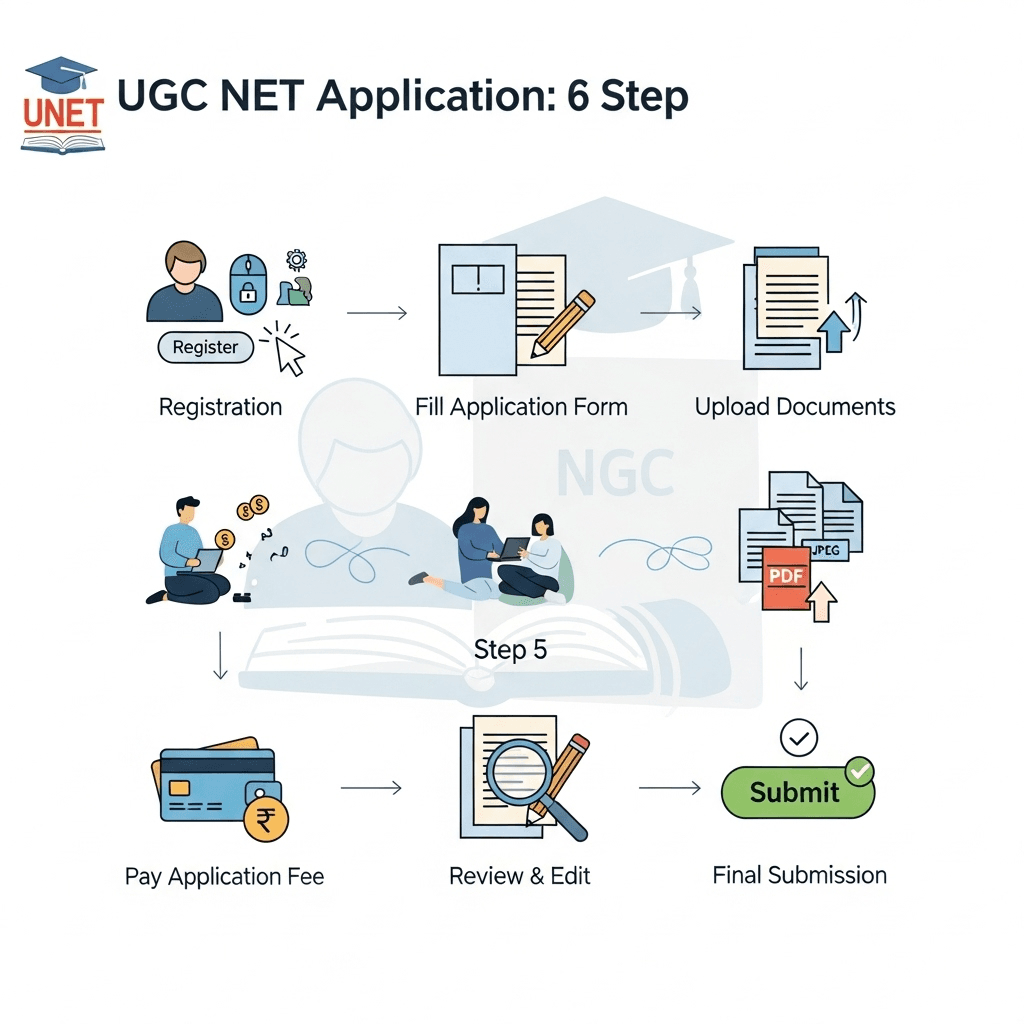
Step 1: New User Registration
- Visit the Official NTA UGC NET Website: Always ensure you are on the legitimate website (nta.ac.in or ugcnet.nta.nic.in). Beware of fraudulent sites.
- Click on “New Registration”: On the homepage, you will find a link to “New Registration” or “Apply for UGC NET [Current Session]”. Click on it.
- Read Instructions Carefully: A detailed set of instructions and a declaration will appear. Read them thoroughly, especially regarding photo/signature specifications and fee details. Check the box indicating you have read and understood.
- Fill Personal Details: You’ll be prompted to enter basic information like your Name, Father’s Name, Mother’s Name, Date of Birth, Gender, Nationality, Identity Type (e.g., Aadhaar number), and your contact details (Email ID and Mobile Number). Ensure these match your official documents.
- Create Password and Security Question: Choose a strong password and select a security question with an answer that you can easily remember but others cannot guess.
- Review and Submit: Before final submission of this registration part, review all entered details. Once satisfied, click ‘Submit’.
- Note Down Application Number: After successful registration, an Application Number will be generated. This is your unique ID for this exam cycle. Write it down carefully and keep it safe. An email and SMS will also be sent to your registered contact details.
Step 2: Filling the Detailed Application Form
- Log In: Go back to the homepage and log in using your newly generated Application Number and the password you created.
- Fill Personal Information: Some details will be pre-filled from your registration. Verify them. Then, fill in additional personal information like your category (General, OBC-NCL, SC, ST, EWS), PwD status, if you are a diabetic, family annual income, etc.
- Choose Your Subject and Exam City: This is a critical step.
- Subject Applied For: Select the subject for which you wish to appear for the UGC NET exam (e.g., Commerce, History, Computer Science). Make sure it aligns with your post-graduation subject or a closely related field.
- Choice of Exam Cities: You will need to select four preferred exam cities in order of your preference. Try to choose cities that are easily accessible to you, preferably within your state or a neighbouring one. For instance, if you’re from Jaipur, you might pick Jaipur, Delhi, Chandigarh, and Lucknow as your choices.
- Provide Educational Qualifications: Enter details of your Class 10th, 12th, Graduation, and Post-Graduation. This includes the name of the board/university, year of passing/appearing, percentage/CGPA, and subjects. If you are in your final year/semester of PG, select “Appearing.”
- Research/Teaching Experience (if any): If you have any prior research or teaching experience, provide the necessary details.
Step 3: Uploading Documents
- Upload Scanned Photograph: Upload your recent passport-sized photograph according to the specified dimensions and size (e.g., 10 KB to 200 KB in JPG/JPEG). Ensure it’s clear and meets all guidelines.
- Upload Scanned Signature: Upload your scanned signature according to the specified dimensions and size (e.g., 4 KB to 30 KB in JPG/JPEG). It should be clear and legible.
- Check Image Quality: After uploading, verify that the images are correctly displayed and are not blurred or distorted. Incorrect images can lead to form rejection.
Step 4: Review and Finalize
- Review Your Entire Application Form: This is perhaps the most important step. Before final submission, a preview of your entire application form will be displayed. Read every single detail – your name, father’s name, date of birth, category, subject, exam cities, educational qualifications – with utmost care. A single typo can cause immense trouble later during verification.
- Confirm Declaration: Once you are absolutely certain that all details are correct, tick the declaration box affirming the accuracy of the information provided.
Step 5: Fee Payment
- Proceed to Payment: After reviewing, proceed to the payment gateway. The application fee varies based on your category.
- Choose Payment Method: You can pay using a Debit Card, Credit Card, Net Banking, or UPI.
- Complete Transaction: Follow the on-screen instructions to complete the payment. Keep your banking details handy.
- Note Down Transaction ID: Once the payment is successful, a transaction ID will be generated. Make a note of it. If the payment fails for any reason, don’t worry. Wait for some time and try again, or use an alternative payment method. Do NOT try to fill a new form.
Step 6: Print Confirmation Page
- Download and Print Confirmation Page: After successful payment, a confirmation page will be generated. This page is proof that your application has been successfully submitted. Download it immediately.
- Save and Print: It’s highly recommended to save a digital copy (PDF) and print at least two hard copies of the confirmation page. You might need it for future reference or during the admit card download/counselling process. Consider it your golden ticket!
Common Pitfalls to Avoid
Even with a step-by-step guide, some common errors can trip up aspirants. Be mindful of these:
- Last-Minute Rush: Do NOT wait until the final day to apply. The NTA server can get overloaded, leading to technical glitches, payment failures, and immense stress. Apply at least a week before the deadline.
- Incorrect Category Selection: Ensure you select your correct category. Submitting a false claim can lead to disqualification.
- Mismatch in Name/DOB: The name, father’s name, mother’s name, and Date of Birth must exactly match your 10th-class certificate. Even minor spelling differences can create issues.
- Poor Quality Scans: Blurry photos or illegible signatures will lead to rejection. Ensure your scanned documents meet the specifications.
- Invalid Email/Mobile: Use an email ID and mobile number that you actively use and will have access to throughout the exam cycle.
A Little Boost from UGC NET Coaching: Your Partner in Success
Filling the application form is just the beginning. The real journey lies in preparing for the exam itself. While you’ve mastered the application process, let us help you master the syllabus and ace the UGC NET. At UGC NET Coaching, we understand the aspirations of every Indian student aiming for JRF or an Assistant Professor position.
Our expert faculty, many of whom are JRF holders and PhDs themselves, provide comprehensive coaching tailored to the UGC NET syllabus. We offer:
- In-depth Subject Knowledge: Covering every topic in your chosen subject with clarity and practical examples.
- Strategic Study Material: Well-researched, updated, and easy-to-understand notes and practice questions.
- Extensive Mock Tests: Simulating the actual exam environment to build your speed, accuracy, and confidence.
- Personalized Doubt Clearing: Dedicated sessions to address all your queries and clear conceptual roadblocks.
- Time Management Techniques: Essential strategies to optimize your performance on exam day.
We believe in nurturing talent and transforming potential into success. Think of us as your academic navigators, guiding you through every challenge, from complex theories to exam temperament. Our proven track record speaks for itself, with countless students achieving their dreams with our support.
Conclusion
Completing your UGC NET application form correctly is a significant first step on your academic ladder. It shows your dedication and readiness for the rigors of higher education and research. Follow these steps diligently, pay attention to every detail, and avoid common mistakes. With your application successfully submitted, you can now shift your entire focus to what truly matters: your preparation!
Remember, every big journey starts with a confident first step. You’ve taken yours. Now, let’s prepare to conquer the exam!
Ready to turn your aspirations into achievements?
Don’t just apply for the UGC NET; prepare to ace it with the best guidance available.
Contact UGC NET Coaching today to explore our courses, attend a demo class, and start your journey towards a bright academic future!

![UGC NET Preparation: The Ultimate Guide to Ace Your Exam [Proven Strategies]](https://ugcnetcoaching.com/wp-content/uploads/2025/08/image-1.png "UGC NET Preparation: The Ultimate Guide to Ace Your Exam [Proven Strategies] 4")